Discover ChatGPT's advanced voice mode. Learn about its features, its limitations, how to access it, and the ways you can customize it.
Key takeaways
- Advanced Voice Mode processes spoken language directly, enabling it to understand tone, non-verbal cues, and replicate accents.
- The feature is mobile-only with a 15-minute daily limit before reverting to standard voice mode.
- Users can choose from nine voices with distinct personalities, from easygoing Arbor to inquisitive Vale.
OpenAI started rolling out the advanced version of ChatGPT's voice mode in July 2024, and it is now available to everyone. The standard version was amazing; it was super fun to hold conversations with ChatGPT, but it was obviously still a work in progress. The speech sounded a bit off, and it didn’t have many features. To sum it up, it was like an advanced voice model vocalizing a regular ChatGPT response.
That’s not the case anymore. First of all, the speech of the advanced voice mode has improved remarkably; it feels real...a bit too real, in fact. It even gives some people the uncanny valley vibes. Besides the improvement in the speech, since the advanced mode runs on models built for live conversation (GPT-4o at launch, GPT-Live-1 today), its reasoning is much better. Of course, that’s not all.
Remember when asking Alexa to whisper went viral? People were going wild over how weird it felt. Well, the internet needs to prepare itself because, let alone whispering, the advanced voice model can replicate accents, and it’s actually somewhat good at it.
Who can use ChatGPT's Advanced Voice Mode?
Everyone. The advanced voice mode rolled out to Plus and Team users on September 27, 2024, and OpenAI has since opened it to every ChatGPT plan, free included. The launch exclusions for the EU, Switzerland, Iceland, Norway, and Liechtenstein no longer apply: it is available globally in the ChatGPT mobile app and on chatgpt.com.
How to use ChatGPT Advanced Voice Mode
You can use the advanced voice mode in the ChatGPT mobile app and on chatgpt.com. The steps below use the mobile app.
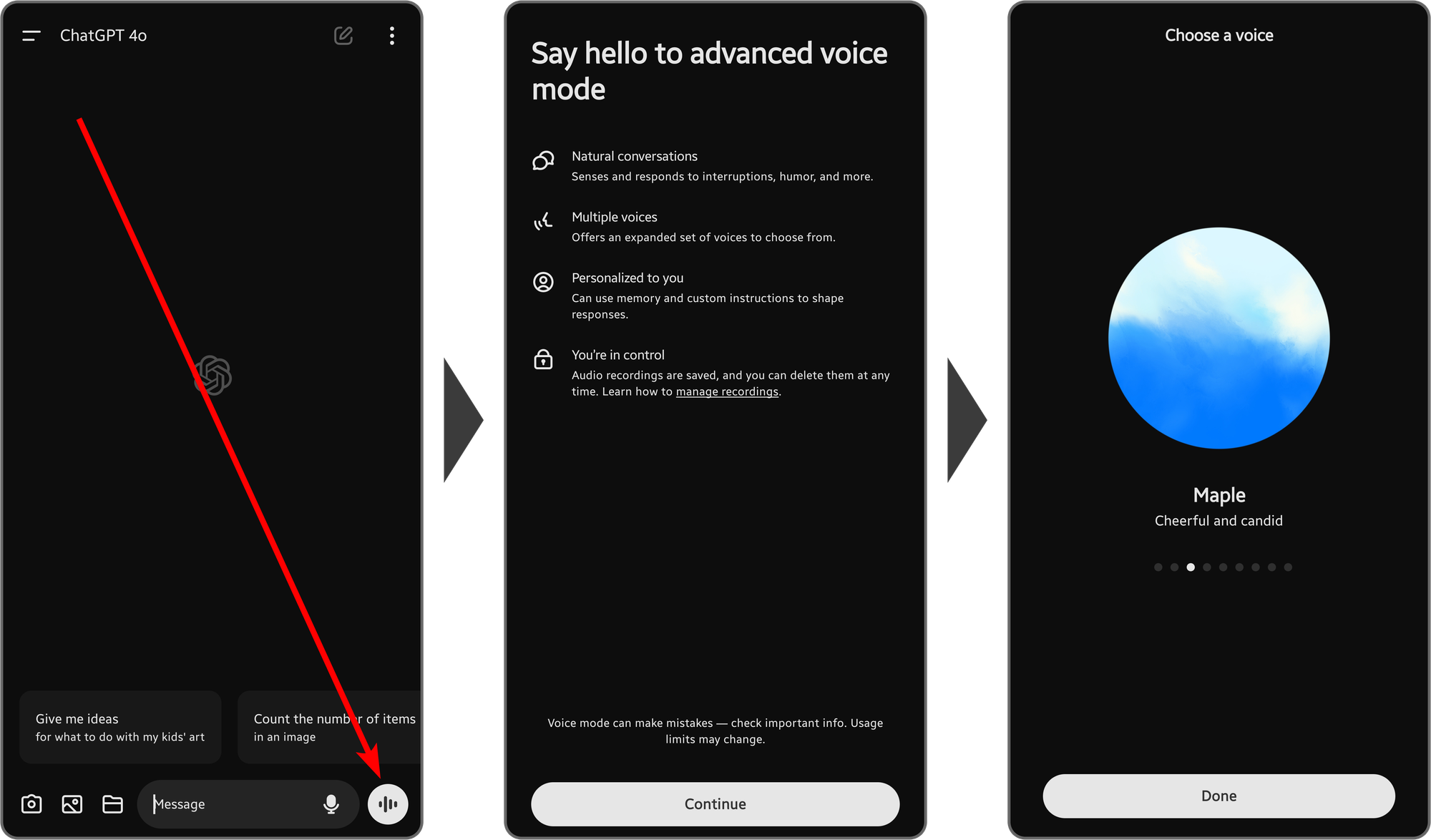
When you open a chat with ChatGPT in the app, you’re going to see a volume bar button at the bottom right of your screen, right next to your input field. Pressing on it will display the introduction screen of the advanced voice mode. Press the Continue button at the bottom of your screen. This is going to take you to the Choose a voice step. There, you can select from nine different voices. According to OpenAI’s Advanced Voice Mode FAQ, they are:
- Arbor - Easygoing and versatile
- Breeze - Animated and earnest
- Cove - Composed and direct
- Ember - Confident and optimistic
- Juniper - Open and upbeat
- Maple - Cheerful and candid
- Sol - Savvy and relaxed
- Spruce - Calm and affirming
- Vale - Bright and inquisitive
As you can see, OpenAI changes not only the voice but the tone as well. After selecting the voice you like, press the Done button at the bottom of your screen. This will take you to the voice mode of ChatGPT, where you can start talking with it.
What makes advanced voice mode unique?
The standard version of the voice mode is great, but it can’t match the advanced mode. Perhaps the biggest improvement of the advanced voice mode is the dynamic interactions. For example, the standard mode relies on speech-to-text transcribing; the advanced mode, however, processes the spoken language. This means that it analyzes your speech tone and can adapt its own tone as well. How cool is it that it can now understand non-verbal cues?
For example, you can ask the advanced voice mode to whisper, yell, talk like Batman, or even talk in a specific accent. This kind of dynamic customizability is a big improvement over the standard mode.
The limitations of ChatGPT's advanced voice mode
The advanced voice mode, as we’ve mentioned, is only available to Plus and Team subscribers, but even if you’re a subscriber, you won’t be able to use the feature if you’re residing in the EU zone, Switzerland, Iceland, Norway, and Liechtenstein.
Free users get hours of advanced voice a day, and Plus users get near-unlimited use. You’ll get a notification when you’re close to your limit, and once you pass it, ChatGPT switches you to a lighter voice model.
Do you like using ChatGPT? Monetize your GPTs with Whop
If you use ChatGPT often, chances are you have your own GPT. If you do, you should consider setting it to private and monetizing it with Whop. GPTs are an amazing way to improve ChatGPT's efficiency, and you can generate income by putting them behind a paywall.
Signing up to Whop and selling access to your content takes less than 10 minutes.
Frequently asked questions
Does ChatGPT's advanced voice mode have a daily usage limit?
Yes, but it is generous now: free users get hours a day and Plus users get near-unlimited use. Past the limit, ChatGPT switches you to a lighter voice model.
Does OpenAI use my voice mode chats to train models?
With the default settings, OpenAI isn’t going to use your voice mode conversation to train the AI. You can opt-in to training via the settings, which will let OpenAI use the chat transcriptions but not the audio. You can choose to share your audio chat with OpenAI by turning on the Improve the model for everyone setting.
Which countries have access to advanced voice mode?
The advanced voice mode is available globally, including in the EU, Switzerland, Iceland, Norway, and Liechtenstein, which were left out at launch.
How many voice options are available in advanced voice mode?
There are nine voice options for the advanced voice mode, and each has its own speech tone.
Do custom GPTs support advanced voice mode?
No, user-made GPTs do not support advanced voice mode; however, they do support the standard mode.